AI Playbook, Part 2: Your AI Implementation Checklist
AI is a very fast employee who can see everything you let them see.
In Part 1 of the AI Playbook we said AI is like a brilliant new hire on their first day. The part of that comparison that never makes the brochure is that this new hire reads at a million words a minute. It can open any file you have ever left unlocked.
This AI implementation checklist starts with understanding that AI does not create new access. It simply uses the permissions your people already have, at a speed that makes every shortcut you took over the last ten years visible in about four seconds.
A true story of it going wrong
In 2023, engineers at Samsung used the public version of ChatGPT to debug confidential source code and summarize internal meeting recordings. The catch is that free and personal versions of tools like ChatGPT can use what you type to train future versions of the AI. Once your information is in there, you cannot pull it back out, and pieces of it could surface in answers given to other people, including competitors. Within weeks Samsung had banned the tools outright and started building its own.
The second risk is quieter and much closer to home. Picture a payroll spreadsheet saved years ago to a SharePoint site that was shared with the whole company. When the company later turns on Copilot and someone asks what the sales team earns, it pulls the numbers straight from that spreadsheet. Copilot did not break any rules. It found a file that person could already open and did the digging they never would have bothered to do. You can see the difference for yourself on our AI integration page, which shows the same question asked before and after the data is locked down.
Step 1: Decide which AI is allowed
Start by picking the business tool your team is permitted to use. For many Microsoft 365 clients that means Copilot. It works inside the tools you already use, and Microsoft promises in their service agreement that what you type and what you upload stay private and off limits for training. ChatGPT, Claude, and Gemini all have business tiers with similar promises. Personal and free accounts do not, and should be off limits for anything about the business.
Step 2: Put it in writing
With a tool chosen, the next step is a simple AI policy. It should name the approved tool and spell out what must never be pasted into any AI, such as client records or payroll details. It should also make clear that a person reviews anything AI wrote before it leaves the building. Add the policy to your employee onboarding paperwork, and have everyone already on the team sign it too.
Step 3: Lock down overshared files
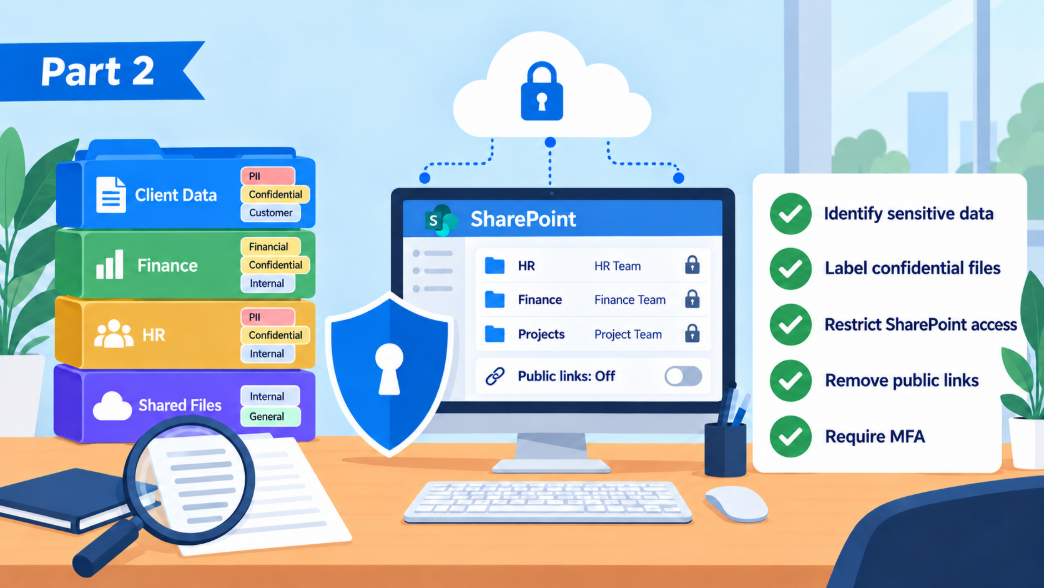
This is the step Microsoft's own planning guides spend the most time on. It is the one most AI implementation checklists treat as the hardest, because before AI, oversharing was a theoretical risk. After AI it is one search away.
- Find sites, folders, and Teams shared with "everyone" or "everyone except external users" and ask whether they should be.
- Find sites nobody owns anymore. Departed employees leave orphaned folders behind, and those folders keep their permissions forever.
- Put sensitivity labels on the small set of truly sensitive material, such as payroll, contracts, client records, and anything regulated. Labeled files can be walled off from AI entirely.
- Change the default so a new file is shared with specific people, not the whole company.
Be warned that this is the hardest and longest part of getting ready. IT cannot finish it alone, because only your department heads know which folders hold sensitive information and who truly needs to see them. Start with the obvious ones like HR and payroll, along with anything tied to sales commissions or client contracts. Lock those down first, then work outward from there.
Step 4: Tidy the data itself
AI answers from what is there. If there are six versions of the price list and four of them are wrong, it will sometimes quote a wrong one. Archive stale documents, delete the obvious duplicates, and give the live version of important files an unmistakable name. A clean shared drive is the cheapest AI upgrade you will ever buy.
Step 5: Lock the front door
An AI assistant makes a hijacked account far more valuable to a criminal. Instead of rummaging through an inbox for hours, they can ask the assistant to find the wire instructions and summarize the CEO's travel plans. So before AI goes live, every account needs multifactor authentication. The strongest options are passkeys and an authenticator app such as Microsoft Authenticator, which are far harder to fool than a texted code. Sign-ins from unexpected countries and unmanaged devices should be blocked. This is the same advice we give without AI in the picture. AI just raises the stakes.
Step 6: Start with a focused pilot group
Pick five to eight of your most productive people, ideally the ones who are good at giving honest feedback. Give them licenses first. Point them at a limited set of well kept sites rather than everything. Let them find the rough edges (they will) and fix those before the whole company gets access. Microsoft's guidance follows the same shape. Start with a pilot program, then expand to the full team, and make a habit of reviewing permissions as you go.
Microsoft's own planning reading
If you want to see the source material, these are the pages we work from. They are written for IT people, but the introductions are readable by anyone.
- Data, Privacy, and Security for Microsoft Copilot explains what Microsoft does and does not do with your information.
- Secure and governed data foundation for Copilot is Microsoft's deployment blueprint for fixing oversharing before rollout.
- Security for Microsoft Copilot covers how Copilot inherits the protections already in Microsoft 365.
- Microsoft Copilot adoption hub offers scenario libraries and rollout kits for the people side.
Getting ready for AI is a real project, and you don't have to take it on alone. If you would like a partner to handle the cleanup with you, contact our AI integration specialists. We also have a free AI employee policy you can hand to your team.
Catch up on Part 1, What Is AI and What Is It Good For, or keep going with Part 3, What AI Really Costs Coming soon.
 Guide
GuideAI Playbook, Part 1: Understanding AI and Its Real Business Uses
Start with AI Playbook Part 1: what AI is, where it helps a business, and how to think about it without the tech talk or the hype.
Read article → Company news
Our Biggest Security Upgrades of 2026: ClickFix Shield and More
Wireguided just released three security upgrades. A free interactive Threat Test customized to each person who takes it, free real-world security training, and ClickFix Shield, the first IT provider protection that blocks the attack, alerts the employee, and steers them straight to training.
Read article → Security
Passkeys, explained: the sign-in with nothing to steal
What a passkey is, why it is safer than a texted code, and how to set one up in two minutes. Plus the Microsoft dates that make it urgent for business accounts.
Read article →